> For the complete documentation index, see [llms.txt](https://gs23.gitbook.io/greyservices/llms.txt). Markdown versions of documentation pages are available by appending `.md` to page URLs; this page is available as [Markdown](https://gs23.gitbook.io/greyservices/copy-of-gs23-services/fix-garbled-language-+-chinese-translation-tools/gs23-translator-+-broken-language-fix-for-menus.md).
# GS23 Translator + Broken Language Fix for Menus
***
GS23 Translator Tool
***
We have a new tool that will help you translate Errors from our menus. You are able to translate the image and see exactly what it says as text or an image that overlays onto the existing image.
The Tool WILL NOT work unless you click Fix Broken/Garbled button at the top. This changes your Non-Unicode Region to Chinese SImplified to the Translator can function correctly. If you dont do this you wont be able to translate the errors. You can revert this by turning it off using the tool and selecting your correct Region.
Download Run as ADMIN or REGION buttons wont work
***
### **Change Region Unicode to** Chinese Simplified to fix Broken text Manual
***
This will let you read the Broken language or Alien text as people call it. Please do this before making a ticket
***
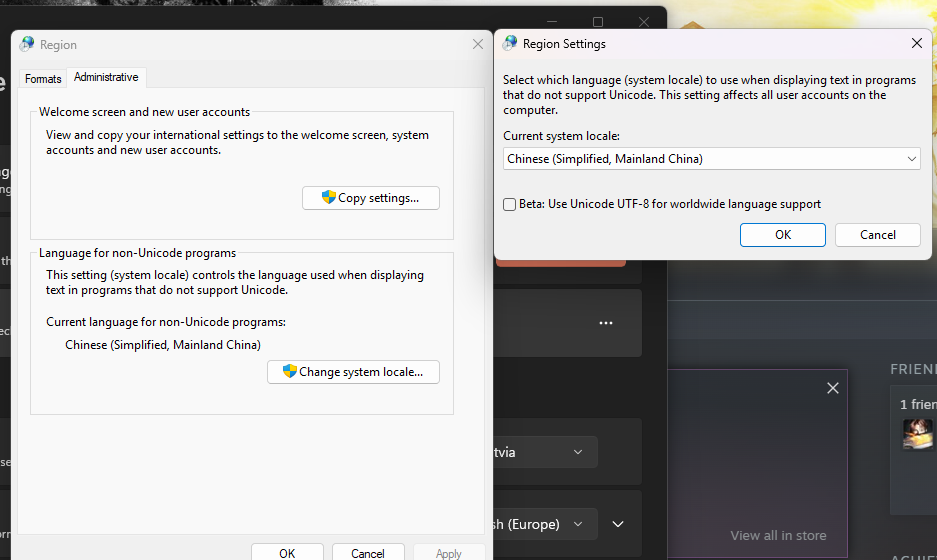
* Search Control Panel in windows. Open up Control Panel and search for Region in the search bar. Then click the Region on the left. it should look like the image below
* When the Region opens click on Administrative and then change current system locale to Simplified Chinese.
* Restart PC and you will be able to translate the Menu instead of it showing Garbled Text that cant be read or translated.
***