> For the complete documentation index, see [llms.txt](https://gs23.gitbook.io/greyservices/llms.txt). Markdown versions of documentation pages are available by appending `.md` to page URLs; this page is available as [Markdown](https://gs23.gitbook.io/greyservices/copy-of-gs23-services/the-first-steps/gs23-security-tool-+-pc-setup-video.md).

# GS23 Security Tool + PC Setup Video

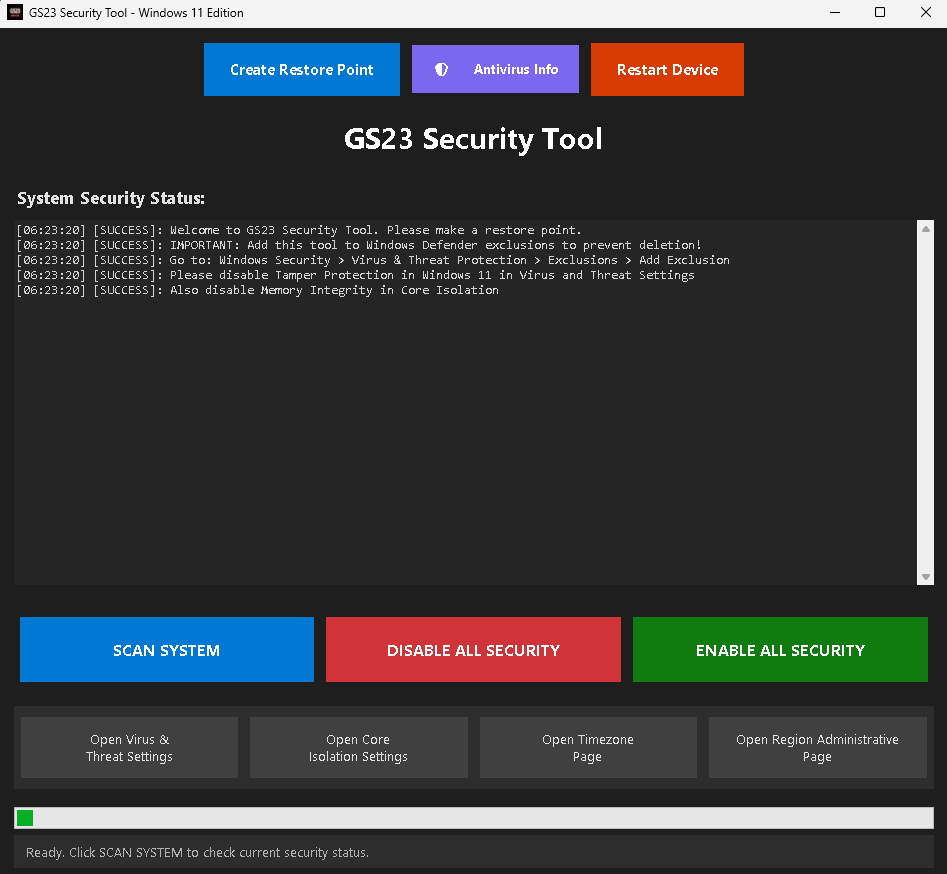
## <mark style="color:$warning;">**This is our Brand New Tool that will help you set up your pc in a few clicks. This works for Windows 10 + 11 only**</mark> <a href="#required" id="required"></a>

***

### <mark style="color:red;">**!!!!!!! Please always make a restore point !!!!!!!**</mark> <a href="#required" id="required"></a>

***

Windows 10/11 - Not working on Windows 11 25h2 - DO NOT USE DEFENDER CONTROL. Will conflict tool

***

#### <mark style="color:$warning;">**Windows 11 ONLY you must do this before loading the Tool.**</mark>&#x20;

***

1. <mark style="color:$primary;">First head into Virus & Threat Settings in windows and disable Tamper Protection only.</mark>![](https://4133156249-files.gitbook.io/~/files/v0/b/gitbook-x-prod.appspot.com/o/spaces%2F9Wc0oAKxoqgkEtJfQd25%2Fuploads%2FIsH3yYQdiNGbgKx1cQT0%2Fimage.png?alt=media\&token=ac993b44-4085-4807-974a-36f7430abc1e)    <mark style="color:red;">DISABLE THIS</mark>&#x20;
2. Then head into Core Isolation settings and Disable Memory Integrity. ![](https://4133156249-files.gitbook.io/~/files/v0/b/gitbook-x-prod.appspot.com/o/spaces%2F9Wc0oAKxoqgkEtJfQd25%2Fuploads%2FhODniFlaZ3M9PqyW8u58%2Fimage.png?alt=media\&token=c377f330-9e4b-43c0-824c-982ae304e2de)    <mark style="color:red;">DISABLE THIS</mark>&#x20;
3. Restart PC.
4. <mark style="color:$primary;">Load GS23 Security Tool as Admin.</mark>
5. Create a Restore Point.<br>

***

#### <mark style="color:$warning;">Windows 10 ONLY you must do this before loading the Tool.</mark>&#x20;

***

1. <mark style="color:$primary;">Please head into Core Isolation page and Disable Memory Integrity.</mark>![](https://4133156249-files.gitbook.io/~/files/v0/b/gitbook-x-prod.appspot.com/o/spaces%2F9Wc0oAKxoqgkEtJfQd25%2Fuploads%2FcnGoJJIK9HYJJCXEXgJx%2Fimage.png?alt=media\&token=7901d004-46c2-42f2-8379-04a395b8e7c9)  <mark style="color:red;">DISABLE THIS</mark>&#x20;
2. <mark style="color:$primary;">Restart PC.</mark>
3. <mark style="color:$primary;">Load GS23 Security Tool as Admin.</mark>
4. Create a Restore Point.

### <mark style="color:$warning;">**Download our New GS23 Security Tool Here :**</mark> <a href="https://mega.nz/file/a4E1zCwC#f9t_vWP3H_jkfE50sORrJDWpI-PZFXfTKSp70dexwaI" class="button primary">GS23 Security Tool</a>  <a href="#required" id="required"></a>

***

<div align="center"><figure><img src="https://4133156249-files.gitbook.io/~/files/v0/b/gitbook-x-prod.appspot.com/o/spaces%2F9Wc0oAKxoqgkEtJfQd25%2Fuploads%2F1gQ0qSfD4ZPmm2285lve%2Fimage.png?alt=media&amp;token=e381a040-2b4e-4be1-8837-7cf790ea45e4" alt=""><figcaption></figcaption></figure></div>

<h3 id="required" align="center"></h3>

***

### <mark style="color:$warning;">**We have a VIDEO TUTORIAL to help you get your computer/pc ready for our menus to work, you can do the settings manually if you prefer than using our tool. PLEASE WATCH THE VIDEO TO AVOID ANY ISSUES.**</mark> <a href="#required" id="required"></a>

***

{% embed url="<https://www.youtube.com/watch?ab_channel=Blue&v=z-mqYmJXJ18>" %}

<div align="center"><figure><img src="https://4133156249-files.gitbook.io/~/files/v0/b/gitbook-x-prod.appspot.com/o/spaces%2F9Wc0oAKxoqgkEtJfQd25%2Fuploads%2Fgeeizmc9AkY2OKjNuBI2%2Fimage.png?alt=media&amp;token=5e2de2b7-71b7-434b-9d79-fb20c653ea66" alt=""><figcaption></figcaption></figure></div>